Quick Answer
Practical digital signage ideas for fitness studios, Part 2 of 5
Members and visitors already walk past your screens.
A Membership Promotion screen uses that moment to show one clear offer: a membership upgrade, a personal training session, a class pack, a referral campaign or a seasonal promotion.
This is advertising, but it is advertising inside your own studio, to people who already know what you do.
What is a Membership Promotion screen?
It is a digital signage slide, usually one of several in a rotating playlist, that shows a single promotional message.
Rather than a poster that stays on the wall until someone takes it down, a Membership Promotion screen can be updated from the Framebaker CMS, scheduled to appear at specific times, and displayed on one screen or across every screen in your studio simultaneously.
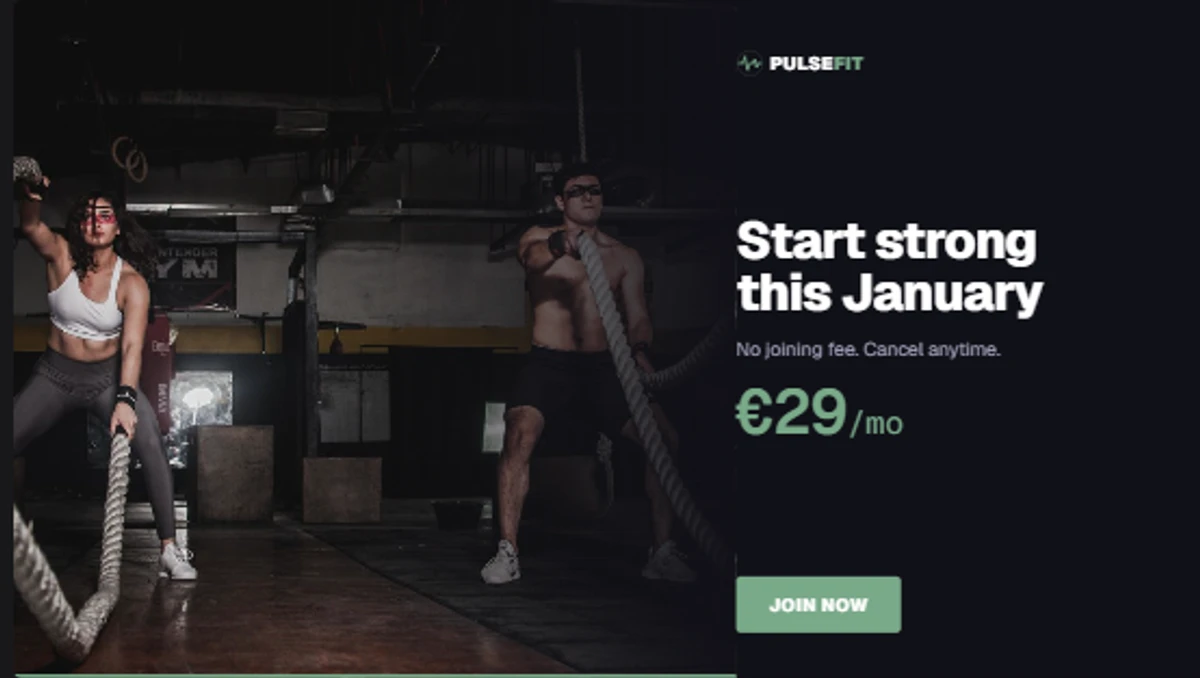
The Membership Promotion template in Framebaker. Update the offer details, apply your studio branding, and publish to your screens.
What can you promote with it?
The template is not limited to membership sign-ups. Any offer that can be described in a headline and a short line of text works.
Common uses in fitness studios:
- Upgrade to a premium or annual membership
- First personal training session offer
- Class packs or multi-visit passes
- Bring a friend this month
- Student or corporate memberships
- Seasonal campaigns: January, summer, back-to-gym
- Open day or taster session
- Supplements, apparel or equipment sold in your studio
One promotion per slide. If you have two offers running at the same time, create two slides and let them rotate.
What content do you need?
The template has a straightforward structure. For each promotion you need:
- Headline: the name of the offer, kept short
- Body copy: one or two lines describing the offer or its terms
- Call to action: what the member or visitor should do next, such as “Ask at reception”, “Sign up today” or “Scan to find out more”
- Background: a brand colour, a gradient or a suitable image from your studio
The template handles the layout. You provide the offer details.
Keep the copy honest and specific. “20% off your first month” is clearer than “Amazing membership deals available now.”
Keep one clear message
A promotion screen works best when it communicates one thing.
Members and visitors glance at screens while they wait, arrive or leave. They are not reading carefully. A slide with three offers, small print and a busy background is harder to process than a single clear headline.
If you want to promote more than one thing, use separate slides in your playlist rather than putting everything on one screen.
Where should the screen appear?
Reception is the most practical location. Members and visitors spend time there when they arrive, check in or collect belongings before leaving. That dwell time gives them a moment to read an offer.
A lounge or waiting area also works well for the same reason.
Studio entrances are less suitable. Members walking in or out of a class are usually focused on the session, not on offers.
Reception
Best placement. Natural dwell time on arrival and departure.
Lounge or waiting area
Good option. Visitors have time to read before their session.
Studio entrance
Less effective. Members are focused on their class.
How the template works in Framebaker
The Membership Promotion template is available in the Framebaker template library for fitness studios.
To set up a promotion:
Open the template
Select the Membership Promotion template from the fitness template library.
Add your offer details
Enter your headline, body copy, call to action and background. No design work required.
Publish to your screens
Add the slide to a playlist, set the schedule, and publish. Update the offer any time from the CMS.
Prefer a different style? Use this template as a starting point, or let us help create a custom version for your studio.
Scheduling is flexible. You can show the promotion all day, during specific hours, or only on certain days. When a campaign ends, remove the slide or replace it with the next offer.
Combine it with your other fitness templates
A Membership Promotion slide works best as part of a playlist rather than running on its own.
A typical reception playlist might rotate between:
- Class schedule: what is on today, times and rooms
- Membership Promotion: the current offer
- Trainer spotlight: a profile of one of your team
- Upcoming events: open days, workshops, challenges
Members pay more attention to a screen that is regularly useful. A screen showing nothing but promotions is easier to ignore.
Make every visit count
A Membership Promotion screen does not replace a conversation at reception.
It creates a moment of awareness. A member who sees an offer for a class pack while they are waiting to check in is more likely to ask about it than one who only hears about it by chance.
The screen does not need to close the sale. It just needs to be visible, clear and up to date.
Explore fitness digital signage templates to see the Membership Promotion template, the Class Schedule template, and the other tools included in the Framebaker fitness solution.
See Framebaker in your browser
No installation. No sales call. Start managing screens in minutes.
Frequently Asked Questions
What is a Membership Promotion screen?
A Membership Promotion screen is a digital signage slide that displays one clear offer to members and visitors inside your studio. It can show a membership upgrade, a personal training offer, a class pack, a referral campaign or a seasonal promotion. It is typically displayed as part of a rotating playlist alongside your class schedule and other content.
What content do I need to set up a Membership Promotion template?
You need a short headline, a one or two line description of the offer, a call to action (such as "Ask at reception" or "Sign up today"), and optionally a background image or your studio's brand colours. The template handles the layout. You fill in the offer details.
Where should a Membership Promotion screen appear in my studio?
Reception is the most common placement, since members and visitors spend time there when they arrive or leave. A lounge or waiting area also works well. Studio entrances are less suitable because members are usually focused on their class rather than an offer.
Can I show a Membership Promotion screen alongside my class schedule?
Yes. In Framebaker, a playlist can rotate between your class schedule and a Membership Promotion slide. You control how long each slide shows and when it appears. The schedule keeps members informed; the promotion uses the remaining screen time.
Can I run different promotions at different times of day?
Yes. Framebaker supports scheduled playlists, so a morning slot can show a personal training offer while an evening slot shows a different campaign. Once configured, the screen switches automatically without any manual changes.
Related Articles
Framebaker for fitness
Put your membership promotions on screen
Explore the fitness digital signage templates, hardware and pricing.