Quick Answer
Practical digital signage ideas for fitness studios, Part 4 of 5
Things change in every fitness studio.
A class is cancelled. Holiday opening hours are announced. A workshop is fully booked. A new course starts next month.
The challenge isn’t writing the announcement. It’s making sure members actually see it.
An Announcement & Event screen gives important updates a visible place inside your studio, where members naturally look while arriving, waiting or leaving.
What is an Announcement & Event screen?
It is a digital signage slide, usually one of several in a rotating playlist, that displays timely information members should know about.
Unlike a permanent information screen, the content changes regularly as new announcements and events are added.
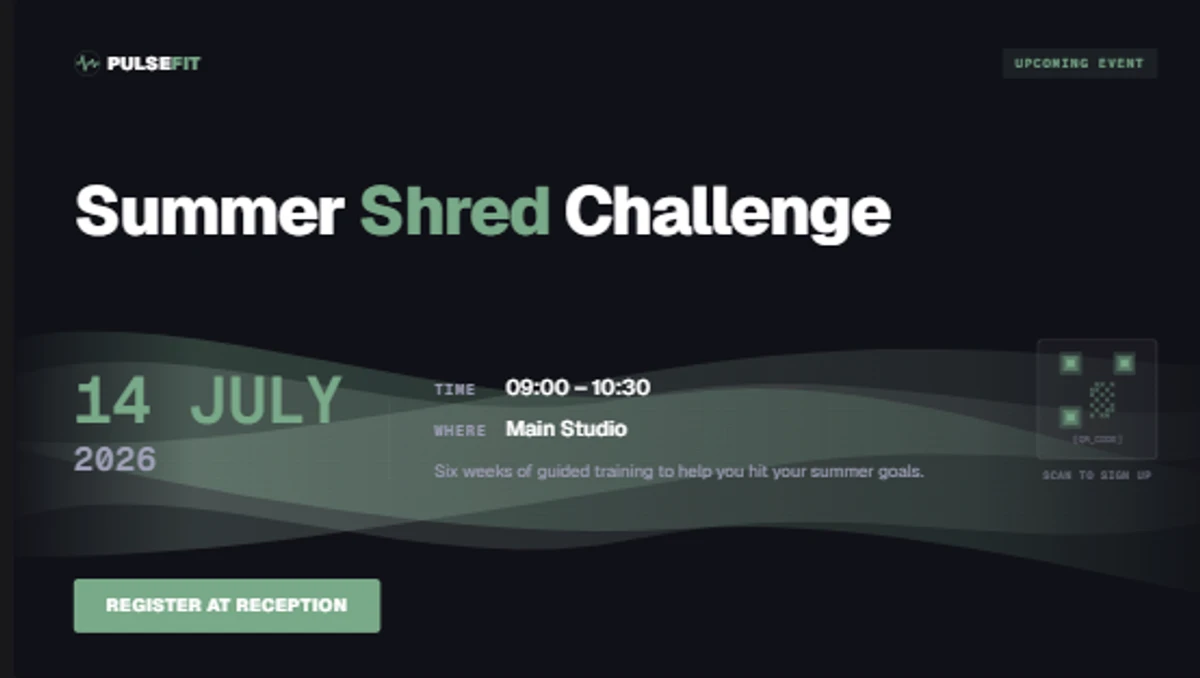
The Announcement & Event template in Framebaker. Add your upcoming events, set the display dates, and publish to your screens.
Typical examples include:
- Class cancellations or changes
- Workshops and nutrition seminars
- Charity workouts and member appreciation evenings
- Guest trainer sessions
- Studio anniversary events
- Equipment maintenance notices
- Open days and taster sessions
- Holiday opening hours
It keeps your communication organised and easy to update.
What information should you include?
The best announcements answer three simple questions:
- What is happening?
- When is it happening?
- Does the member need to do anything?
Avoid large blocks of text. A clear title, short description, date and, if needed, a QR code or website link is usually enough. Members only have a few seconds to read your screen.
Example announcement
Summer Shred Challenge
Starts 14 July
09:00–09:30 · Main Studio
Register at reception or scan the QR code.
Keep announcements current
Outdated announcements create confusion.
If a screen still advertises last month’s workshop or yesterday’s opening hours, members stop paying attention.
Keeping announcements current is just as important as creating them.
With Framebaker, you can update the announcement once and publish it to every connected screen.
Where should announcement screens be displayed?
Announcement screens work best where members naturally pause for a moment.
Reception
Ideal placement. Members and visitors have time to read on arrival and departure.
Waiting area or lounge
Good option. Natural dwell time before and after sessions.
Studio corridor
Useful for reaching members moving between areas throughout the day.
Connect with your existing calendars
Many studios already keep events somewhere else.
They may live in Google Calendar, Outlook, a booking platform or even an RSS feed.
Rather than copying the same information into another system, Framebaker can display content from supported integrations. That means fewer manual updates and less chance of outdated information appearing on your screens.
How the template works in Framebaker
The Announcement & Event template is ready to use from the Framebaker template library for fitness studios.
To set up an announcement:
Add your announcement
Enter the event title, short description, date and any optional link or QR code.
Choose the display dates
Set when the announcement should appear and when it should be removed automatically.
Publish to your screens
Add the slide to a playlist and publish. When the event ends, update the content or schedule the next announcement.
Prefer a different style? Use the template as a starting point, or let us help create a custom version that matches your studio branding.
Combine it with your other fitness templates
Announcement screens work well as part of a rotating playlist rather than running on their own.
A typical playlist could rotate between:
- Today’s Class Schedule
- Announcement & Event
- Trainer Spotlight
- Membership Promotion
- Motivational Quote
Members stay informed while your screens remain varied and interesting throughout the day.
Keep communication simple
Good communication doesn’t need to be complicated.
An Announcement & Event screen helps members stay informed without relying on posters, social media or reception staff to repeat the same information throughout the day.
It’s a simple template that helps your studio stay organised.
Explore Framebaker for fitness studios to see the Announcement & Event template, the Class Schedule template, and the other tools included in the Framebaker fitness solution.
See Framebaker in your browser
No installation. No sales call. Start managing screens in minutes.
Frequently Asked Questions
What should I show on an Announcement screen?
Anything that members should know in advance, such as holiday opening hours, workshops, special classes, maintenance or upcoming events.
Can announcements be scheduled?
Yes. Display announcements only during the dates you choose and replace them automatically when a campaign ends.
Can I connect my calendar?
Yes. Depending on your setup, announcements can come from Google Calendar, Outlook, RSS feeds or other supported integrations instead of being entered manually.
Can I customise the design?
Yes. The included template is ready to use, but it can also be customised to match your studio branding.
Can I publish different announcements to different locations?
Yes. You can choose exactly which screens should display each announcement.
Related Articles
Framebaker for fitness
Keep every member informed
Explore the fitness digital signage templates, hardware and pricing.